Help center support eXpress
We've collected answers to popular questions to make eXpress easy and convenient to use. Didn't find the answer to your question? Contact our support team.
eXpress Federation Architecture
- Welcome to eXpress
- eXpress Support
- Introducing eXpress & Glossary
- About eXpress
- eXpress Federation Architecture
- Glossary
- Installation & Updates & Requirements
- Registering & Logging In
- User Profile
- Chats, Channels & Threads
- Contacts
- Tags & Tabs
- Files
- Calls & Conferences
- Push Notifications & Counters
- Fixing Background Work on Mobile
- Bots & SmartApps
- Diagnostics, Logs, and Cache
- Admin Panel
eXpress Federation Architecture
- Regional Transport Server, RTS
- Corporate Transport Server, CTS
- Enterprise Transport Server, ETS
- Server Interaction in the Federation
Corporate and public servers are united in the common eXpress federation:
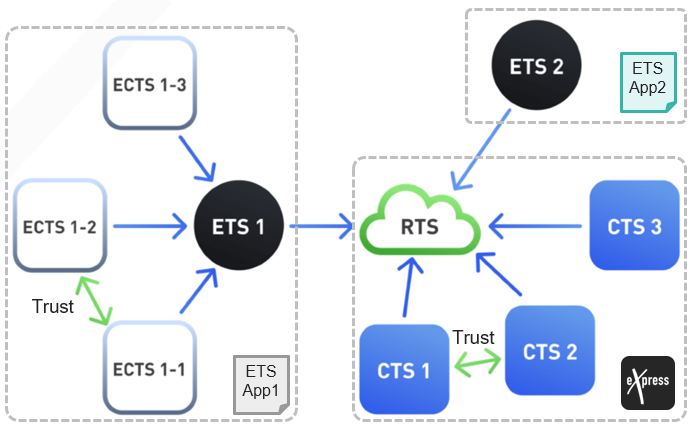
What is the eXpress Federation?
It's a network of regional and corporate eXpress servers. It includes all public regional (RTS
) and corporate (Lite
, CTS
) servers and some enterprise servers (ETS
, eCTS
), which have it's own customized version of the app.
What Does the Federation Offer?
Within the federation, users of different organizations can:
- Exchange messages and files
- Schedule conferences and calls
- Interact with users from other companies
Regional Transport Server, RTS
RTS
It is a public cloud server. In eXpress, contacts and RTS servers are marked with green icons.
For Administrators: Purpose & Features of RTS
Purpose of RTS
- Global routing of messages between all members of the federation (both corporate and external users) in any apps;
- Initial user registration on RTS,Lite,CTS(including working with SMS codes), and guest profiles;
- Sending push notifications to eXpress client apps for RTS,Lite,CTSusers.
Features of RTS
- There are several such servers; they are located in Russia and are managed by the eXpress vendor.
- You can register on RTSfor free using a personal non-corporate account in eXpress. The app features for such an account are limited.
Who Administrates the RTS?
The server side is administered by eXpress support.Corporate Transport Server, CTS
Lite
CTS
CTS
contacts and servers are marked with blue icons.
- Litecorporate server is aCTScorporate server with limited functionality.
- A corporate server that follows ETSinstead ofRTSis calledeCTS.
For Administrators: Purpose & Features of CTS/eCTS
Purpose of CTS/eCTS
- Corporate user authentication Lite,CTS/eCTS; guest profiles (if configured);
- Routing and storing files and messages of corporate users;
- Corporate phonebook;
- Direct interaction with other corporate servers (of this organization or a partner organization);
- Other functions for corporate communications (conferences, bots, etc.).
Features of CTS
- CTSprovides basic messaging functions within an isolated, secure corporate network. To communicate with each other, employees of the organization need to register on the corporate server.
- All CTSandLiteservers are connected toRTSdirectly and use it for registration and sending push notifications.
- An organization may have several corporate CTSservers, and trusted connections (trusts) can be established between them. Users of one trust server can search for users of another. Traffic between trust servers goes directly, bypassingRTS.
Who Administrates the CTS?
The server side is administered by your organization's support, a partner, or paid eXpress technical support.Can a Regular CTS Be Disconnected From the Federation?
No.CTS
cannot work in isolation.
Enterprise Transport Server, ETS
ETS
eCTS
instead of CTS
. The server is an analogue of the public RTS
server, which unites CTS
servers. The server is managed by an organization, for example, the one you work for. In eXpress, ETS
contacts and servers are marked with blue icons.
For Administrators: Purpose & Features of ETS
Purpose of ETS
- ETStakes over the functions of the publicRTSserver for the branded app;
- Routing of messages between users: employees of one eCTScommunicate securely with employees of anothereCTS;
- Initial registration of users within the organization’s contour (including working with SMS codes);
- Sending push notifications to branded client apps within the organization.
Features of ETS
- ETSis installed only within the organization's perimeter.
- The organization independently manages security policies and contour access.
- Initial user registration takes place within the organization’s perimeter and can be customized.
- Users connect to ETSthrough a special branded app. The organization distributes it. Before publishing in app stores, the code can be checked.
- Users register on eCTS. Users cannot stay on ETS.
- RTSusers can register on theETSclient app. If the user was a corporate user in eXpress, a logout is required, otherwise an error is displayed.
- Users' phonebooks are stored on ETS.
- ETSis independent ofRTS, but is linked toRTSby default so thatETSusers can communicate with users ofRTSand otherCTS. NeweCTSare created onETS, andRTS“does not know” about them.ETScan also work autonomously, in complete isolation.
Who Administrates the ETS?
Server-side administration is handled by your organization support, or by partner, or by paid eXpress technical support.Server Interaction in the Federation
What Unites Servers in the Federation?
- Routing of messages, files, and calls. RTSis a global gateway for all traffic between non-trustedCTSand for traffic to and from public users.ETSis the same gateway inside the enterprise’s “mini-federation” for its owneCTS.
- End-to-end identification of users by HUID. It is performed by RTSorETS.
- Trusted connections (trusts). A trust connection can be established between two corporate servers (CTS/eCTS) of the same or different organizations. Trust servers enable direct traffic exchange bypassingRTS, trust search for users, and extended permissions for invitation links and files from within the corporate network (CDTN).
For Administrators: How to Manage Trusts
Trusts are managed by the administrator on the Trusts tab in the admin panel.CTSeCTS - Distributed storage of chats and files. Cross-server chats and channels, cross-server call and conference recordings, and transferred files are replicated to the servers of all participants — see “Storage and Deletion of Chats” and “Files”. This also explains what history a new participant from a “fresh” server sees — see “Chat History”.
- Isolated ETSdoes not participate in the common federation: its users cannot see users fromRTS/CTS/otherETSservers, and vice versa — see the definition of “Isolate”.
- Emergency mode of the corporate server is enabled when the root server is unavailable. It disables trust connections and interaction with external users — see details below.
- The eXpress global chat is the only system chat common to all users of the federation. It is sent by RTS. The administrator of the corporate server can disable it on their server — see “Global Chats”.
For Administrators: How to Configure My Server to Operate in the Federation?
CTS
ETS
eCTS
Details on administering trusts, network perimeter restrictions, and links with CTS
ETS
eCTS
public / corporate / trust access levels can be found in the admin panel FAQ.
For Administrators: Corporate Server Emergency Mode When RTS Is Unavailable
Lite
CTS
eCTS
If Lite
CTS
eCTS
RTS
becomes unavailable, a regular CTS
/Lite
server or an eCTS
server subordinate to a non-isolated ETS
enters emergency mode. In this state:
| App Function | CTS Lite |
eCTS (non-isolated ETS ) |
|---|---|---|
| Registration and login of new corporate users | Not working. Current sessions remain active. | Working, but a synchronization queue with the federation builds up |
| SMS code verification | Not working | Working |
| Push notifications | Not working | Working, except when push notifications are proxied through RTS |
| Synchronization of user public keys | Not working | Working, but a synchronization queue with the federation builds up |
| Trusted server connections | Working as long as authentication tokens are valid | Working |
| Creating chats, calls, and conferences | Working as long as authentication tokens are valid, but only with users from this server and trusted servers. Guests must be created on this server — more details. | Working, but only with users from this server and trusted servers. Guests must be created on this server — more details. |
| Server contact directory | Working as long as RTS authentication tokens are valid. Over time, the phonebook becomes outdated, and users from other servers start showing as “Unknown User” | Working, but becomes outdated over time, and users from other servers start showing as "Unknown User" |
- CTS/Liteserver does not support fully autonomous operation without a connection toRTS— both the corporate server and the client need access to it.
- eCTSserver in the federation (under a non-isolatedETS) can operate without a connection toRTSfor a certain period of time.
- eCTSserver under an isolatedETSnormally operates without a connection toRTS.
How Does Traffic Flow in an Interserver Chat/Call?
| Participant Composition | Route |
|---|---|
| Single server ( CTS /eCTS ) |
Local only on the server |
| Only trusted CTS /eCTS |
Directly between servers, bypassing RTS |
| Non-trust corporate servers | Via RTS |
| At least one public (external) user | Via RTS |
What Is Needed to Communicate With Colleagues on Other Servers?
Typically, no additional steps are required: you can communicate with colleagues on other federation servers immediately. For more details on finding colleagues, see this article. If your organization's or network provider's policy restricts your network connection, contact support or the administrator of your organization, partner, or provider. Ask them to grant network access to your devices.How to Switch to an Isolated Environment?
To disconnect from the eXpress federation, your organization needs to deploy and configure anETS
server and buy a license for it.