Help center support eXpress
We've collected answers to popular questions to make eXpress easy and convenient to use. Didn't find the answer to your question? Contact our support team.
- Welcome to eXpress
- eXpress Support
- Introducing eXpress & Glossary
- Installation & Updates & Requirements
- Registering & Logging In
- Registration & Authentication in the App
- Phone and Credentials
- Corporate Email
- Corporate Server Address
- QR Code
- Registration & Authentication Security
- Sessions and Logging in on Another Device
- Additional Data Protection — Personal Password and PIN Code
- Registration & Logging In Troubleshooting
- User Profile
- Chats, Channels & Threads
- Contacts
- Tags & Tabs
- Files
- Calls & Conferences
- Push Notifications & Counters
- Fixing Background Work on Mobile
- Bots & SmartApps
- Diagnostics, Logs, and Cache
- Admin Panel
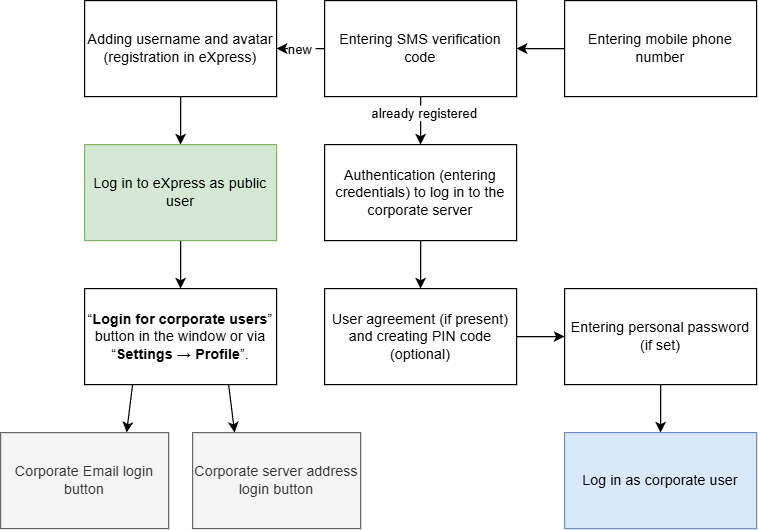
Phone and Credentials
The registration and authentication scheme using a phone number in eXpress:
Can I Stay on Public Server Without Logging Into Corporate Server?
Yes, if you register in eXpress using your phone number. On the login screen, choose Phone and credentials and enter your number. When the app asks for a corporate email, tap Skip and confirm the action. You will stay on the public server.
How Do I Register With a Phone Number While in the US or Canada?
Contact eXpress support: they will help you with registration.Is There an SMS Receiving Limit?
Yes. If you sign up or sign in to eXpress with your phone number, the number of attempts to receive an SMS is limited. This block can be lifted through support. The SMS provider may have its own daily limit: 10 attempts for Russian mobile operators. It cannot be removed. After a recent SIM card change, you may need to wait 1–2 days.
- You can request a code no more than once per minute.
- The sent code remains valid until you request a new one: as soon as a new code arrives, the previous one stops working.
- The daily limit resets at 00:00 Moscow time, regardless of the time of the first attempt.
Why Does the SMS Code Not Arrive at a Foreign Number?
SMS codes are not sent to foreign numbers. You can log in without SMS:
- with a QR code, if you are already logged in to eXpress on another device;
- via corporate email or corporate server address, if your organization has connected you to its server.
If none of these options works for you, contact eXpress support.
Not Getting SMS Code? What to Do?
If the code does not arrive or an error occurs, do not request it again: contact your organization's support or eXpress support immediately.
What Does the “Leave the Server” Button Do?
When you sign in again, the Leave the server button sends a logout request from the corporate server. If your organization's server administrator confirms the logout, the same device will be required to log in again.
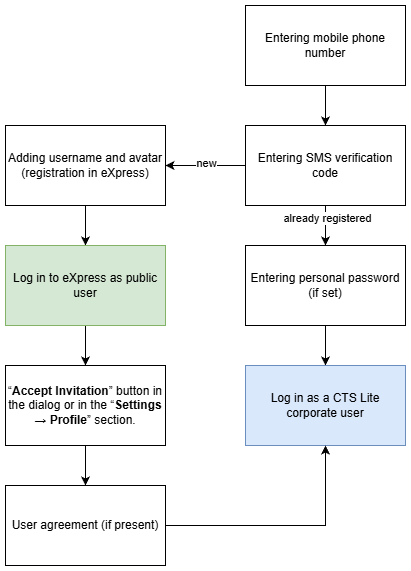
Authentication on an eXpress Lite Server
The registration and authentication scheme on eXpress Lite server is as follows: