Help center support eXpress
We've collected answers to popular questions to make eXpress easy and convenient to use. Didn't find the answer to your question? Contact our support team.
Corporate Server Address
- Welcome to eXpress
- eXpress Support
- Introducing eXpress & Glossary
- Installation & Updates & Requirements
- Registering & Logging In
- Registration & Authentication in the App
- Phone and Credentials
- Corporate Email
- Corporate Server Address
- QR Code
- Registration & Authentication Security
- Sessions and Logging in on Another Device
- Additional Data Protection — Personal Password and PIN Code
- Registration & Logging In Troubleshooting
- User Profile
- Chats, Channels & Threads
- Contacts
- Tags & Tabs
- Files
- Calls & Conferences
- Push Notifications & Counters
- Fixing Background Work on Mobile
- Bots & SmartApps
- Diagnostics, Logs, and Cache
- Admin Panel
Corporate Server Address
CTS
eCTS
CTS
/eCTS
) address. Login without a phone number. Requires an existing corporate account.
Can I Switch From Phone Number Login to Server Address Login?
⚠️ If you previously logged in with a phone number, use the Phone and credentials button or connect to the corporate server in the profile settings (eXpress). Otherwise, when you link a new number, another account will be created, and your chat history may be lost.
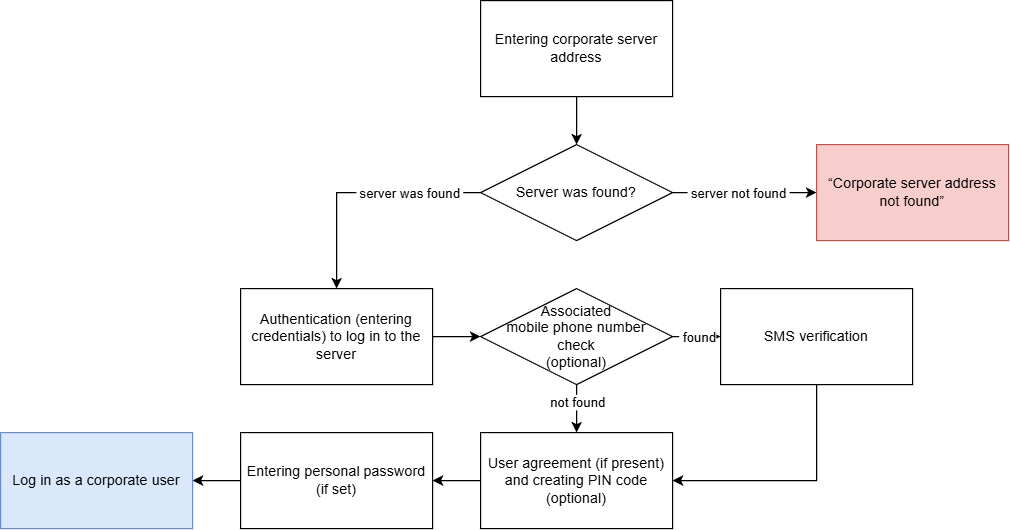
What Happens After Entering Corporate Server Address?
RTS
(eXpress) or ETS
(branded ETS
app) searches for the server at this address.
- If server is found — server authentication screen opens.
- If server is not found — “Corporate server address not found” error.
What Does the “Leave the Server” Button Do?
When you sign in again, the Leave the server button sends a logout request from the corporate server. The same device will be required to log in again.Why Was SMS Verification Still Required?
The system found a mobile phone number associated with the profile.
The SMS code is not requested when:
- You are a user of the public RTSserver and connect to a corporateCTSserver via Settings > Profile in the eXpress app.
- Your corporate server administrator has disabled SMS confirmation when signing in with email or server address for the internal corporate network, and you are connecting from it.